Microsoft SSIS (SQL Server Integration Services)
Microsoft SSIS (SQL Server Integration Services) is an enterprise data integration, data transformation and data migration tool built into Microsoft's SQL Server database. It can be used for a variety of integration-related tasks, such as analyzing and cleansing data and running extract, transform and load, or ETL, processes to update data warehouses.
SSIS can extract, transform and consolidate data from multiple relational databases, as well as sources such as XML data files and flat files, then load the processed information into an enterprise data warehouse or other target systems. It includes a set of tools for developing and testing integration programs, called SQL Server Data Tools, plus a server component for deploying and running the programs. In addition, Microsoft's SQL Server Management Studio software is incorporated into SSIS for managing and monitoring integration routines.
SSIS history
Microsoft SSIS was introduced with SQL Server 2005 as a replacement for an earlier integration tool called Data Transformation Services (DTS). Before the release of DTS with SQL Server 7.0 in 1998, database administrators either wrote custom data transformation tools or used third-party tools to transfer data.
Microsoft has added a number of features to SSIS over the years, including graphical tools and wizards, which allow users to build and debug packages; workflow functionality, such as file transfer protocol operations; the ability to execute SQL statements; the ability to email messages; data sources and destinations for ETL; transformations for collecting, cleansing, merging, and copying data; a management service; the ability to administer package execution and storage; and application programming interfaces (APIs) for SSIS object models. Among the most popular features are the data import/export wizard and packaged data source connectors.
SQL Server 2016 improvements
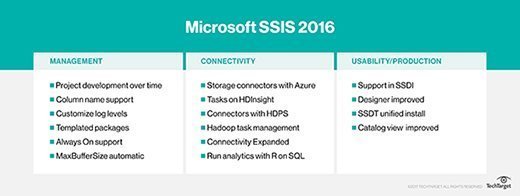
SQL Server 2016 introduced the SQL Server Integration Services Database Package (SSISDB) Upgrade Wizard. This tool enables IT pros to upgrade the catalog database when it is older than the current version of SQL Server. It can also be used in some disaster recovery situations that require a restoration from backup. The SSISDB Wizard upgrades the catalog database to match whatever version of SQL Server is being used.
SQL Server 2016 Integration Services enables admins to add an SSIS catalog database to an AlwaysOn Availability Group. It also includes improved package management, where admins can save a container or a control flow task as a reusable template through Integration Services. Also included within SQL Server 2016 was an SSIS Feature Pack for Azure. This allows admins to connect to Azure data sources and to transfer data between the Azure cloud and data sources that are located on premises.
Microsoft released connectors for SSIS in 2016, including the Connector for SAP Business Warehouse for SQL Server 2016, Connector versions 4.0 for Oracle and Teradata, and the Connector for Analytics Platform System Appliance Update 5.
SQL Server 2017 improvements
SQL Server 2017 brought new SSIS features, such as Scale Out for SSIS, which makes it easier to run SSIS on multiple machines. Admins can avoid a single point of failure for the entire Scale Out deployment. Also included is an improvement to the failover handling of the executing logs from Scale Out Workers. The execution logs persist to local disk if the Scale Out Worker stops suddenly.
The SSIS catalog also includes a new global property which specifies the default mode to execute SSIS packages. This applies when IT pros call the stored procedure with the runinscaleout parameter set to null.
SSIS support
SSIS is version-specific, so users must have the version of SSIS that matches their SQL Server edition. In addition, SSIS isn't supported in SQL Express or Workgroup editions. Users have to buy the Standard, Business Intelligence or Enterprise editions to get the SSIS designer and runtime components as well as basic data profiling tools and prebuilt transformations. Advanced adapters and advanced transformations are only available in the Enterprise edition.