Home > SQL Server Tips > Stored Procedures > Stored procedure: Determine last database backup
SQL Server Tips:
EMAIL THIS
 TIPS & NEWSLETTERS TOPICS 

STORED PROCEDURES

Stored procedure: Determine last database backup


Michelle Gutzait, Contributor
04.06.2006
Rating: -4.36- (out of 5)


Expert advice on database administration
Digg This!    StumbleUpon Toolbar StumbleUpon    Bookmark with Delicious Del.icio.us    Add to Google


An experienced DBA understands the meaning of backups.

Say a project manager calls you just as you are about to leave the office to spend a nice, quiet evening with your wife or husband. "Help! We just dropped our main table in production. It was a mistake! We need to recover it ASAP to the latest version we have ...."

Your blood has gone from your face to your feet and your whole existence is wondering: Do I really have a backup for this database? When was the last time I checked the maintenance plans? What would happen if I couldn't find the right backup?

Imagine that you have more than 200 SQL Server instances to administer, and you simply want to know when the last backup was taken for each database on each instance so you can anticipate if there will be trouble. You have maintenance plans and you are sending yourself e-mail messages on failure, but are you sure you have maintenance plans are in place for every new database? Are you sure the backup frequency is correct?

Here is a small stored procedure to help you verify such backup information.

TABLE OF CONTENTS
   p_SelectLastDatabaseBackups
   Stored procedure results
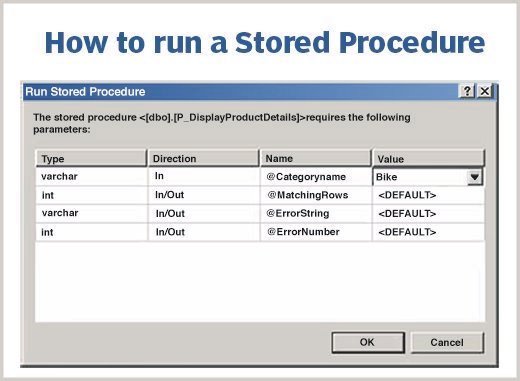
   How to run the stored procedure

  p_SelectLastDatabaseBackups Return to Table of Contents

Create proc p_SelectLastDatabaseBackup
as
select max(isnull(datediff(dd,b.backup_start_date,getdate()),0)) 
as 'Number of Days since last backup',
b.type as  'Backup type (D-database,L-log)', b.backup_size, d.name 
as database_name
from  master..sysdatabases d with (nolock)
left join msdb..backupset b  with (nolock) 
on d.name = b.database_name 
and b.backup_start_date = (select max(backup_start_date) 
                                   from msdb..backupset b2 
                                   where b.database_name = b2.database_name
                                  and b2.type = 'D')
where d.name != 'tempdb'
group by d.name, b.type, b.backup_size
union all
select max(isnull(datediff(dd,b.backup_start_date,getdate()),0)) 
as 'Number of Days since last backup',
b.type as  'Backup type (D-database,L-log)', b.backup_size, d.name 
as database_name
from  master..sysdatabases d with (nolock)
join msdb..backupset b  with (nolock) 
on d.name = b.database_name
and b.backup_start_date = (select max(backup_start_date) 
                                   from msdb..backupset b2 
                                   where b.database_name = b2.database_name
                                   and b2.type = 'L')
group by d.name, b.type, b.backup_size
order by d.name,b.type   -- optional

  Stored procedure results Return to Table of Contents

*
Number of days since last backup Backup type (D-database, L-log) Backup_size Database_name
104 D 12664832 My_database1
3 L 84480 My_database1
105 D 2705920 Northwind
79 L 12345 Master
79 D 1231 Msdb
50 D 11397120 My_database2
49 D 11261440 My_database3
0 NULL NULL NoBackupsDatabase

Note that the last database was never backed up!

You can play with the given query as it suits you. For example, if you add the HAVING clause, you can perform such tasks as:

    1. Querying backups only when the last one ran more than X days ago.
    2. Querying backups only when the backup size is more than Y.
    3. Capturing all backup information for reports.

  How to run the stored procedure Return to Table of Contents

You can run this query on each SQL Server instance. There are several ways to do so, including:

    1. Creating one or several DTS packages that connect to each instance, running the script and copying the results to the central server.
    2. Running the script on each instance: running a local job and sending e-mail message with the results.
    3. Building a program that connects to all the known SQL Server instances (using SQL-DMO or creating a list in a table or in a file), running the script and centralizing the data.

Tip: How to check backups in all the other known instances from one central database

Say you want to run a stored procedure only once and get the backup information from all existing database on all the known SQL Serverinstances on the network. How do you do that? Watch this:

As a DBA, I like to code things in my natural habitat. I feel more comfortable doing that. And I like to run this stored procedure from a central database. Seems impossible? Let's see how you can do that.

Step 1: Choose a SQL Server instance with a central database that will collect all of the backup information. All of the following steps must run on this central machine, SQL instance or database accordingly.

Step 2: We can use the OSQL –L command to create the list of SQL Server instances on the network. Books Online says that the -L option "Lists the locally configured servers and the names of the servers broadcasting on the network."

Run OSQL –L once from the Command Line and check the list:

  • If you don't see all the servers, you should define the missing ones in the "Client Network Utility" as an Alias.
  • If you see old servers, try to delete their entry from the aliases in the "Client Network Utility."

To run Client Network Utility: Go to Start --> Programs --> Microsoft SQL Server --> Client Network Utility. The "Server alias" is the logical name by which the client recognizes the server. The "Server Name" is the name of the instance or its network address. When you run a query in SQL Server, you always do so from a client tool. If you add an alias where your client is running, you can use it to impersonate a server.

The following offers an example:

If I will connect to Michelle now from the machine where this Alias was defined, I will connect to my (local) SQL Server instance.

Step 3: We also have to make sure that we have common access to the instances on the list either by:

    1. Windows Authentication mode (recommended).
    2. SQL Server Authentication mode (not recommended).

With SQL Server authentication mode, you have to hard code the password. In my example I use (of course) the Windows Authentication mode.

Step 4: Let's create the table that will hold the backup information (you can remove or add columns to suit your requirements).

-------------------------------------------------------------------------
Create a centralized table for backup data (run this only once)
---------------------------------------------------------------------------

if exists (select 1 from sysobjects where type = 'U' and name = 'CentralTableForBackupInfo')
drop table CentralTableForBackupInfo
go
create table CentralTableForBackupInfo
(InstanceName  varchar(500),
 DaysFromLastBackup int,
 BackupType   char(2),
 BackupSizeKB  bigint, 
 DatabaseName  varchar(200))
go

Step 5: Run the following script/SP on a regular basis from the central database (i.e: run a job from SQL SERVER Agent):

CREATE procedure p_SelectAllServersLastDatabaseBackup as   --Optional
set nocount on
declare @InstanceName varchar(400),
 @cmd   varchar(4000),  -- holds the command to be run on each server
 @cmd2  varchar(4000)   -- runs the command on the SQL SERVER instance with OSQLS (xp_cmdshell)

--------------------------------------------------------------------------
Fetch all SQL SERVER known instances with OSQL -L
---------------------------------------------------------------------------

Create table #tmp (InstanceName varchar(1000))
insert into #tmp
Exec master..xp_cmdshell 'osql -L'
delete from #tmp where InstanceName is null or InstanceName like 'Servers:%'
select * from #tmp

--------------------------------------------------------------------------
If the current server is not connected to the network, the string "-- NONE --" will be the result from OSQL -L. There is no meaning for this script to run if there are no other servers.
--------------------------------------------------------------------------

if exists (select 1 from #tmp where InstanceName  like '%-- NONE --%')
begin
 print ('Please connect to the LAN - no servers were encountered!')
 return
end

--------------------------------------------------------------------------
For each server run the script and insert data into a centralized table
--------------------------------------------------------------------------

select @cmd = 'select  convert(varchar(40),max(isnull(datediff(dd,b.backup_start_date,getdate()),0))) 
as Maxd,'+
'b.type,convert(varchar(40),b.backup_size) as backup_size,d.name ' +
'into #t from  master..sysdatabases d with (nolock) ' +
'left join msdb..backupset b  with (nolock) on d.name = b.database_name ' +
'where b.backup_start_date = (select max(backup_start_date) from msdb..backupset b2 where 
b.database_name = b2.database_name and b2.type = ''D'') ' 
'group by d.name, b.type, b.backup_size  ' +
'union all ' +
'select  convert(varchar(40),max(isnull(datediff(dd,b.backup_start_date,getdate()),0))) as Maxd,'+
'b.type,convert(varchar(40),b.backup_size) as backup_size,d.name ' +
'from  master..sysdatabases d with (nolock) ' +
'left join msdb..backupset b  with (nolock) on d.name = b.database_name ' +
'where b.backup_start_date = (select max(backup_start_date) ' +
'from msdb..backupset b2 where b.database_name = b2.database_name and b2.type = ''L'') ' +
'group by d.name, b.type, b.backup_size; ' +
-- Since I am getting results from xp_cmdshell and OSQL - The results are returned in one line (no columns)
-- This is why I separate the values with '@^1^@','@^2^@' and so on, so I can later substring the values
-- easily:
'select ''@^1^@''+Maxd+''@^2^@''+type+''@^3^@''+backup_size+''@^4^@''+name+''@^5^@'' from #t'

create table #tmp2 (a varchar(8000))

declare curs_srvr cursor for select rtrim(ltrim(InstanceName)) from #tmp
open curs_srvr
fetch curs_srvr into @InstanceName
WHILE @@FETCH_STATUS = 0
begin

 select @cmd2 = 'osql -E -S"' + @InstanceName + '" -Q "' + @cmd + '"'

 insert into #tmp2 (a) exec master..xp_cmdshell @cmd2

 delete from #tmp2 where a not like '%@^_^@%' or a is null
 update #tmp2 set a = rtrim(ltrim(a))
 insert into CentralTableForBackupInfo (InstanceName, DaysFromLastBackup,BackupType, 
BackupSizeKB, DatabaseName)
 select  @InstanceName,
  substring(a,charindex('@^1^@',a)+5,charindex('@^2^@',a)-charindex('@^1^@',a)-5),
  substring(a,charindex('@^2^@',a)+5,charindex('@^3^@',a)-charindex('@^2^@',a)-5),
  substring(a,charindex('@^3^@',a)+5,charindex('@^4^@',a)-charindex('@^3^@',a)-5),
  substring(a,charindex('@^4^@',a)+5,charindex('@^5^@',a)-charindex('@^4^@',a)-5)
 from #tmp2
 truncate table #tmp2
 fetch curs_srvr into @InstanceName
end
deallocate curs_srvr
GO

Step 6: The table CentralTableForBackupInfo will look something like this:

After executing the last Stored Procedure (p_SelectAllServersLastDatabaseBackup), the table CentralTableForBackupInfo will look something like this:

InstanceName DaysFromLastBackup Backup Type BackupSizeKB DatabaseName
(local) 104 D 12664832 My_database1
(local) 3 L 84480 My_database1
(local) 105 D 2705920 Northwind
(local) 70 L 12345 master
(local) 0 NULL NULL msdb
(local) 50 D 11397120 My_database2
(local) 49 D 11261440 My_database3
Remote1 0 D 12664899 My_database1
Remote1 0 L 84420 My_database1
Remote1 13 D 98665 My_database6
Remote1 0 D 1232 master

Conclusion

It is a good practice to verify on a regular basis that you have all the backups to avoid unnecessary problems in the future. I know that running this small utility has saved me from disasters many times.

About the author: Michelle Gutzait works as a senior databases consultant for ITERGY International Inc., an information technology consulting firm specializing in the design, implementation, security and support of Microsoft products in the enterprise. Gutzait has been involved in IT for 20 years as a developer, business analyst and database consultant. She She has worked exclusively with SQL Server for the last 10 years, consulting for a diverse group of clients. Her skills include database design, performance tuning, security, high availability, disaster recovery, very large databases, replication, T-SQL coding, DTS packages, administrative and infrastructure tools development, reporting services and more.

More from SearchSQLServer.com

  • Top five: Check out our top five T-SQL stored procedures
  • Tips: View the complete collection of stored procedures
  • Glossary: SQL Server slang stumping you? Look it up in our glossary
  • Updates made to the above tip

    I got the following comments from the reader Steve H. (thank you Steve!), and I've decided to make some changes to my initial document. The remarks were:

    "1. You may want to include Type = 'I' to include Differentials if they are being used.
    2. I had to fight the query string being passed to #tmp2 to strip out spaces because I was getting an error, Input Query String too long. But once I got that figured out, it ran fine.
    3. I saw was that this job doesn't clean up old data, so every time it runs it just adds another set of rows for the server. You may want to mention that you'll want to truncate the CentralTableForBackupInfo at the beginning of each run.
    4. I don't use the OSQL –L much. It is too client dependent for my tastes. We generally use a Configuration Management Database that has all of the servers under our control. We have about 1,200, so obviously, I'm not setting them all up in EM or the Client Network Utility."

    So I changed the original SP to select the max value for each type (solving the First mentioned problem):

    Create proc p_SelectLastDatabaseBackup 
    As
    select max(isnull(datediff(dd,b.backup_start_date,getdate()),0)) 
    as 'Number of Days since last backup',
    b.type as  'Backup type (D-database,L-log)', b.backup_size, d.name 
    as database_name
    from  master..sysdatabases d with (nolock)
    left join msdb..backupset b  with (nolock) 
    on d.name = b.database_name 
    and b.backup_start_date = (select max(backup_start_date) 
                                             from msdb..backupset b2 
                                             where b.database_name = b2.database_name
                                            and b2.type = b.type)
    where d.name != 'tempdb'
    group by d.name, b.type, b.backup_size
    

    I also changed the second stored procedure accordingly:

    a. Changed the basic query as above (this will also solve the problem of the error that occurs due to "Input Query String too long" in #tmp2).
    b. Added an input parameter to get number of days for keeping old data in the CentralTableForBackupInfo table (default = 0 – don't delete). In order to be able to delete the old data, I had to add a Date column to the table and an index – for performance:

    Alter Table CentralTableForBackupInfo add 
                       InsertDate smalldatetime default getdate() NOT NULL
    go
    Create clustered index idx_CentralTableForBackupInfo_InserDate on 
    CentralTableForBackupInfo (InsertDate)
    Go
    

    So here it is:

    CREATE procedure p_SelectAllServersLastDatabaseBackup 
    @p_NumOfDays smallint = 0
    As
      
    set nocount on
    declare @InstanceName    varchar(400),
                @cmd                    varchar(4000),  -- holds the command to be run on each server
                @cmd2                  varchar(4000)   -- runs the command on the SQL SERVER 
                                                                       -- instance with OSQLS (xp_cmdshell)
     
    If @p_NumOfDays > 0
              Delete from CentralTableForBackupInfo 
    where InsertDate <= dateadd(dd,(-1)*@p_NumOfDays,getdate()) 
    

    -----------------------------------------------------------------------------------------------
    Fetch all SQL SERVER known instances with OSQL -L
    -----------------------------------------------------------------------------------------------------

    Create table #tmp (InstanceName varchar(1000))
    insert into #tmp
    Exec master..xp_cmdshell 'osql -L'
    delete from #tmp where InstanceName is null or InstanceName like 'Servers:%'
    

    -----------------------------------------------------------------------------------------------
    If the current server is not connected to the network, the string "-- NONE --"
    will be the result from OSQL -L. There is no meaning for this script to run if
    there are no other servers.
    -----------------------------------------------------------------------------------------------------

    if exists (select 1 from #tmp where InstanceName  like '%-- NONE --%')
    begin
                print ('Please connect to the LAN - no servers were encountered!') 
                return
    end
    

    -----------------------------------------------------------------------------------------------
    For each server - run the script and insert data into a centralized table
    -----------------------------------------------------------------------------------------------------

    select @cmd = 'select  convert(varchar(40),
            max(isnull(datediff(dd,b.backup_start_date ,getdate()),0))) as Maxd,'+
    'b.type,convert(varchar(40),b.backup_size) as backup_size,d.name ' +
    'into #t from     master..sysdatabases d with (nolock) ' +
    'left join msdb..backupset b  with (nolock) on d.name = b.database_name ' +
    'where b.backup_start_date = (select max(backup_start_date) from msdb..
            backupset b2 where b.database_name = b2.database_name and b2.type = b.type) ' +
    'group by d.name, b.type, b.backup_size ;  ' + 
    -- Since I am getting results from xp_cmdshell and OSQL - The results are returned in one
     line (no columns)
    -- This is why I separate the values with '@^1^@','@^2^@' and so on, so I can later substring 
    the values
    -- easily:
    'select ''@^1^@''+Maxd+''@^2^@''+type+''@^3^@''+backup_size+''@^4^@''+name+''@^5^@'' 
          from #t'
     
    create table #tmp2 (a varchar(8000))
     
    declare curs_srvr cursor for select rtrim(ltrim(InstanceName)) from #tmp
    open curs_srvr
    fetch curs_srvr into @InstanceName
    WHILE @@FETCH_STATUS = 0
    begin
     
                select @cmd2 = 'osql -E -S"' + @InstanceName + '" -Q "' + @cmd + '"' 
     
                insert into #tmp2 (a) exec master..xp_cmdshell @cmd2
     
                delete from #tmp2 where a not like '%@^_^@%' or a is null
                update #tmp2 set a = rtrim(ltrim(a))
                insert into CentralTableForBackupInfo (InstanceName, DaysFromLastBackup,BackupType, 
    BackupSizeKB, DatabaseName) 
                select   @InstanceName,
                            substring(a,charindex('@^1^@',a)+5,charindex('@^2^@',a)-charindex('@^1^@',a)-5), 
                            substring(a,charindex('@^2^@',a)+5,charindex('@^3^@',a)-charindex('@^2^@',a)-5), 
                            substring(a,charindex('@^3^@',a)+5,charindex('@^4^@',a)-charindex('@^3^@',a)-5), 
                            substring(a,charindex('@^4^@',a)+5,charindex('@^5^@',a)-charindex('@^4^@',a)-5) 
                from #tmp2
                truncate table #tmp2
                fetch curs_srvr into @InstanceName
    end
    deallocate curs_srvr
    GO
    

    If you manage your instances name in a central table, this is even better, so just take out the #tmp table and use yours instead. The SP will then look like that:

    CREATE procedure p_SelectAllServersLastDatabaseBackup 
    @p_NumOfDays smallint = 0
    As
      
    set nocount on
    declare @InstanceName    varchar(400),
                @cmd                    varchar(4000),  -- holds the command to be run on each server
                @cmd2                  varchar(4000)   -- runs the command on the SQL SERVER 
                                                                       -- instance with OSQLS (xp_cmdshell)
     
    If @p_NumOfDays > 0
              Delete from CentralTableForBackupInfo 
    where InsertDate <= dateadd(dd,(-1)*@p_NumOfDays,getdate()) 
    

    -----------------------------------------------------------------------------------------------
    For each server - run the script and insert data into a centralized table
    -----------------------------------------------------------------------------------------------------

    select @cmd = 'select  convert(varchar(40),max(isnull
           (datediff(dd,b.backup_start_date ,getdate()),0))) as Maxd,'+
    'b.type,convert(varchar(40),b.backup_size) as backup_size,d.name ' +
    'into #t from     master..sysdatabases d with (nolock) ' +
    'left join msdb..backupset b  with (nolock) on d.name = b.database_name ' +
    'where b.backup_start_date = (select max(backup_start_date) from msdb..
          backupset b2 where b.database_name = b2.database_name and b2.type = b.type) ' +
    'group by d.name, b.type, b.backup_size ;  ' + 
    -- Since I am getting results from xp_cmdshell and OSQL - The results are returned in 
          one line (no columns)
    -- This is why I separate the values with '@^1^@','@^2^@' and so on, so I can later 
          substring the values
    -- easily:
    'select ''@^1^@''+Maxd+''@^2^@''+type+''@^3^@''+backup_size+''@^4^@''+name+''@^5^@'' 
          from #t'
     
    create table #tmp2 (a varchar(8000))
     
    declare curs_srvr cursor for select rtrim(ltrim()) 
    from 
    open curs_srvr
    fetch curs_srvr into @InstanceName
    WHILE @@FETCH_STATUS = 0
    begin
     
                select @cmd2 = 'osql -E -S"' + @InstanceName + '" -Q "' + @cmd + '"' 
     
                insert into #tmp2 (a) exec master..xp_cmdshell @cmd2
     
                delete from #tmp2 where a not like '%@^_^@%' or a is null
                update #tmp2 set a = rtrim(ltrim(a))
                insert into CentralTableForBackupInfo (InstanceName, DaysFromLastBackup,BackupType, 
    BackupSizeKB, DatabaseName) 
                select   @InstanceName,
                            substring(a,charindex('@^1^@',a)+5,charindex('@^2^@',a)-charindex('@^1^@',a)-5), 
                            substring(a,charindex('@^2^@',a)+5,charindex('@^3^@',a)-charindex('@^2^@',a)-5), 
                            substring(a,charindex('@^3^@',a)+5,charindex('@^4^@',a)-charindex('@^3^@',a)-5), 
                            substring(a,charindex('@^4^@',a)+5,charindex('@^5^@',a)-charindex('@^4^@',a)-5) 
                from #tmp2
                truncate table #tmp2
                fetch curs_srvr into @InstanceName
    end
    deallocate curs_srvr
    GO
    

    Rate this Tip
    To rate tips, you must be a member of SearchSQLServer.com.
    Register now to start rating these tips. Log in if you are already a member.


    Digg This!    StumbleUpon Toolbar StumbleUpon    Bookmark with Delicious Del.icio.us    Add to Google


    RELATED CONTENT
    Stored Procedures
    Check SQL Server database and log file size with this stored procedure
    Configure SQL Server Service Broker for sending stored procedure data
    Find size of SQL Server tables and other objects with stored procedure
    Stored procedure to monitor long-running jobs in SQL Server 2000
    Make changes to SQL Server stored procedures with batch editing
    Stored procedure to find fragmented indexes in SQL Server
    Use table-valued parameters for SPs in SQL Server 2008
    Examples of SQL Server stored procedures and parameters
    Top 10 SQL Server development questions
    FAQ: SQL Server stored procedure how-tos

    SQL Server backup and recovery
    SQL Server backups using SAN database snapshots
    Tips for scheduling and testing SQL Server backups
    Code to restore SQL Server databases in VB.NET
    Tricking SQL Server into making full database backups
    SAN considerations for your SQL Server environment
    Top 7 SQL Server backup and restore tips of 2007
    Retrieve deleted tables in SQL Server
    SQL Server backup and restore commands to limit downtime
    Mirrored backup and restore commands in SQL Server 2005
    Set up a SQL Server disaster recovery site
    SQL Server backup and recovery Research

    SQL Server stored procedures
    SQL and SQL Server Tutorial and Reference Guide
    SQL Server stored procedures tutorial: Write, tune and get examples
    Check SQL Server database and log file size with this stored procedure
    SQL Server source code analysis and management adds database security
    Configure SQL Server Service Broker for sending stored procedure data
    Find size of SQL Server tables and other objects with stored procedure
    Track changes to SQL Server 2000 and 2005 with one simple utility
    Troubleshoot SQL Server 2005 temporary table performance problems
    Use SQL Profiler to find long running stored procedures and commands
    Stored procedure to monitor long-running jobs in SQL Server 2000

    RELATED GLOSSARY TERMS
    Terms from Whatis.com − the technology online dictionary
    rollback  (SearchSQLServer.com)

    RELATED RESOURCES
    2020software.com, trial software downloads for accounting software, ERP software, CRM software and business software systems
    Search Bitpipe.com for the latest white papers and business webcasts
    Whatis.com, the online computer dictionary

    DISCLAIMER: Our Tips Exchange is a forum for you to share technical advice and expertise with your peers and to learn from other enterprise IT professionals. TechTarget provides the infrastructure to facilitate this sharing of information. However, we cannot guarantee the accuracy or validity of the material submitted. You agree that your use of the Ask The Expert services and your reliance on any questions, answers, information or other materials received through this Web site is at your own risk.

    HomeNewsTopicsITKnowledge ExchangeTipsAsk the ExpertsMultimediaWhite PapersIT Downloads
    About Us  |  Contact Us  |  For Advertisers  |  For Business Partners  |  Site Index  |  RSS
    SEARCH 
    TechTarget provides enterprise IT professionals with the information they need to perform their jobs - from developing strategy, to making cost-effective IT purchase decisions and managing their organizations' IT projects - with its network of technology-specific Web sites, events and magazines.

    TechTarget Corporate Web Site  |  Media Kits  |  Reprints  |  Site Map


    All Rights Reserved, Copyright 2005 - 2008, TechTarget | Read our Privacy Policy
      TechTarget - The IT Media ROI Experts