Home > SQL Server Tips > Microsoft SQL Server > Restore basics: How to restore using T-SQL commands
SQL Server Tips:
EMAIL THIS
 TIPS & NEWSLETTERS TOPICS 

MICROSOFT SQL SERVER

Restore basics: How to restore using T-SQL commands


Greg Robidoux, Edgewood Solutions
03.16.2006
Rating: -4.67- (out of 5)


Expert advice on database administration
Digg This!    StumbleUpon Toolbar StumbleUpon    Bookmark with Delicious Del.icio.us    Add to Google


Another approach to SQL Server backup and restore, aside from using Enterprise Manager as discussed in my previous tip, is to use T-SQL commands. Enterprise Manager can be a quick and easy way to run backups or restores, but T-SQL offers a lot more flexibility. With T-SQL you can script your backups or script to restore several backup files.

If you are not familiar with T-SQL commands or how to construct a restore statement, I offer this side-by-side comparison to show how commands are constructed versus options you may select using the Enterprise Manager GUI.

The basic restore syntax begins with one of two statements, RESTORE DATABASE or RESTORE LOG, depending on the type of restore you are running.

The base commands are as follows:

  • RESTORE DATABASE databaseName
  • RESTORE LOG databaseName

TABLE OF CONTENTS
   Enterprise Manager screen shots to perform a restore
   T-SQL commands to perform a restore


  Enterprise Manager screen shots to perform a restore Return to Table of Contents

Using Enterprise Manager to perform a restore works, but it is often much simpler to run the restore from a command line or to use a command to schedule the restore to run. If you are familiar with Enterprise Manager GUI tools, the following screen shots will show you how they equate to the command line syntax.


Screen Shot #1

Restore as database:

  • This is the same as the databaseName mentioned above.

    Restore: Database

  • This option allows you to read the contents of the backup tables in the MSDB database.
  • Parameters

  • Show backups of database
  • First backup to restore
  • Point in time restore
  • Note: These options are not part of the restore command. They query backup tables in the MSDB database to show you which backups exist for a restore. This same information can be retrieved by querying the backup tables in MSDB.


    Screen Shot #2

    Restore as database:

  • This is the same as the databaseName mentioned above.
  • Restore: Filegroup or files

  • This option allows you to read the contents of the backup tables in the MSDB database for filegroup or file backups.
  • Parameters

  • Show backups of database
  • Select a subset of backup sets
  • Note: These options are not part of the restore command. These options query backup tables in the MSDB database to show you which backups exist for a restore. This same information can be retrieved by querying the backup tables in MSDB.


    Screen Shot #3

    Restore as database:

  • This is the same as the databaseName mentioned above.
  • Restore: From device

  • This option allows you to restore a database from a file or tape device. This is usually selected when you are restoring a backup from another server.
  • Parameters

  • Devices: This allows you to select a list of backup files from disk or tape
  • Restore backup set
    • Database – complete

    • - RESTORE DATABASE
    • Database – differential

    • - RESTORE DATABASE
    • Transaction log

    • - RESTORE LOG
    • File or filegroup

    • - RESTORE FILE
  • Read backup set information and add to backup history
    • This option runs the RESTORE VERIFYONLY command using the LOADHISTORY option.


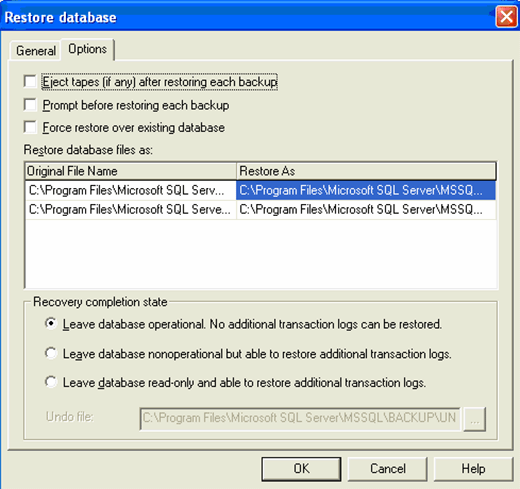
    Screen Shot #4

    Options
    Eject tapes (if any) after restoring each backup

  • UNLOAD

  • Prompt before restoring each backup
  • No equivalent

  • Force restore over existing database
  • REPLACE

  • Restore database files as
  • MOVE 'logical_file_name' TO 'operating_system_file_name'
  • Recovery
    Leave database operational. No additional transaction logs can be restored

  • RECOVERY

  • Leave database nonoperational but able to restore additional transaction logs
  • NORECOVERY

  • Leave database read only and able to restore additional transaction logs
  • STANDBY

  • Undo file
  • This is the name of the undo file used with the STANDBY option

  • Screen Shot #5

    Point in Time Restore

    The point-in-time recovery appends this command to the last transaction log file restored.

    • STOPAT = '1/18/2006 6:23:36 PM'

      T-SQL commands to perform a restore Return to Table of Contents

    As you can see from the following commands, using T-SQL to perform your restores is a pretty straightforward task. Becoming familiar with these command-line options allows you to easily write and reuse your code over and over again. By scripting out the restore commands you can easily write batch routines or dynamic code to perform routine tasks.

    Simple database restore (restores one full backup file):

      RESTORE DATABASE Northwind
      FROM DISK = 'C:\Backups\Northwind_Full_20060307.BAK'

    Simple differential database restore (restores one full backup and one differential backup):

      RESTORE DATABASE Northwind
      FROM DISK = 'C:\Backups\Northwind_Full_20060307.BAK'
      WITH NORECOVERY

      RESTORE DATABASE Northwind
      FROM DISK = 'C:\Backups\Northwind_Diff_20060307.BAK'

    Note: A differential restore must follow a full database restore using the NORECOVERY option. Also, there is no difference in the way the command is constructed to specify a differential restore.

    Simple transaction log restore (restores one full backup and one transaction log backup):

      RESTORE DATABASE Northwind
      FROM DISK = 'C:\Backups\Northwind_Full_20060307.BAK'
      WITH NORECOVERY

      RESTORE LOG Northwind
      FROM DISK = 'C:\Backups\Northwind_Log_20060307.BAK'

    Note: A transaction log restore must follow a full database restore, a differential database restore or another transaction log restore using the NORECOVERY option after each previous restore command.

    Simple filegroup or file restore:

      RESTORE DATABASE Northwind
      FILE = 'Northwind_data'
      FROM DISK = 'C:\Backups\Northwind_File20060307'

    Transaction log restore with a point-in-time restore:

      RESTORE DATABASE Northwind
      FROM DISK = 'C:\Backups\Northwind_Full_20060307.BAK'
      WITH NORECOVERY

      RESTORE LOG Northwind
      FROM DISK = 'C:\Backups\Northwind_Log_20060307.BAK'
      WITH STOPAT = N'3/06/2006 6:23:36 PM'

    Full, differential and transaction log restore:

      RESTORE DATABASE Northwind
      FROM DISK = 'C:\Backups\Northwind_Full_20060307.BAK'
      WITH NORECOVERY

      RESTORE DATABASE Northwind
      FROM DISK = 'C:\Backups\Northwind_Diff_20060307.BAK'
      WITH NORECOVERY

      RESTORE LOG Northwind
      FROM DISK = 'C:\Backups\Northwind_Log_20060307.BAK'

    Full and two transaction log restores:

      RESTORE DATABASE Northwind
      FROM DISK = 'C:\Backups\Northwind_Full_20060307.BAK'
      WITH NORECOVERY

      RESTORE LOG Northwind
      FROM DISK = 'C:\Backups\Northwind_Log_20060307_1.BAK'
      WITH NORECOVERY

      RESTORE LOG Northwind
      FROM DISK = 'C:\Backups\Northwind_Log_20060307_2.BAK'

    Restore with different file names and/or file locations:

      RESTORE DATABASE Northwind
      FROM DISK = 'C:\Backup\Northwind_Full_20060307.BAK'
      WITH MOVE 'Northwind' TO 'C:\Data\northwind_log.ldf',
      MOVE 'Northwind_log' TO 'C:\Log\northwind_data.mdf'

    Restore with different database name:

      RESTORE DATABASE Northwind
      FROM DISK = 'C:\Backup\Northwind_Full_20060307.BAK'
      WITH REPLACE

    Restore database and allow future restores to occur:

      RESTORE DATABASE Northwind
      FROM DISK = 'C:\Backup\Northwind_Full_20060307.BAK'
      WITH NORECOVERY

    Restore database, make it read only and allow future restores to occur:

      RESTORE DATABASE Northwind
      FROM DISK = 'C:\Backups\Northwind_Full_20060307.BAK'
      WITH STANDBY = 'C:\Standby\UNDO_Northwind.DAT'

    Restore contents of a backup file into the MSDB backup system tables:

      RESTORE VERIFYONLY
      FROM DISK = 'C:\Backups\Northwind_Full_20060307.BAK'
      WITH LOADHISTORY


    Summary

    As you can see, the restore commands are not that complicated. Once you are familiar with writing these commands, you will probably begin using Query Analyzer along with the appropriate command to perform your backups and restores. Whether you use Enterprise Manager, Query Analyzer, Maintenance Plans or third-party tools, all of these options use the same processing and will log when backups and restores occur into the backup and restore system tables in the MSDB database. The GUI tools are great when you need to do something once or very infrequently, but the command-line syntax is much more powerful and flexible when you need to do the same thing over and over again.

    About the author: Greg Robidoux is the president and founder of Edgewood Solutions LLC, a technology services company delivering professional services and product solutions for Microsoft SQL Server. He has authored numerous articles and has delivered presentations at regional SQL Server users' groups and national SQL Server events. Robidoux, who also serves as the SearchSQLServer.com Backup and Recovery expert, welcomes your questions.


    More information from SearchSQLServer.com

  • Tip: Restore basics: How to restore using Enterprise Manager
  • Learning Guide: Address backup and restore dilemmas with this guide
  • Topic: Research backup and recovery best practices


  • Rate this Tip
    To rate tips, you must be a member of SearchSQLServer.com.
    Register now to start rating these tips. Log in if you are already a member.


    Submit a Tip


    Digg This!    StumbleUpon Toolbar StumbleUpon    Bookmark with Delicious Del.icio.us    Add to Google


    RELATED CONTENT
    Microsoft SQL Server
    Can you shrink your SQL Server database to death?
    Using SQL Server datetime functions GETDATE, DATENAME and DATEPART
    Tuning SQL Server performance via memory and CPU processing
    Get SQL Server log shipping functionality without Enterprise Edition
    SQL Server 2008 backup compression pros and cons
    How to use SQL Server 2008 hierarchyid data type
    Tuning SQL Server performance via disk arrays and disk partitioning
    Should you upgrade to SQL Server 2005 or SQL Server 2008?
    SQL Server data conversions from date/time values to character types
    Using full-text search for symbols in SQL Server

    SQL Server backup and recovery
    Get SQL Server log shipping functionality without Enterprise Edition
    SQL Server 2008 backup compression pros and cons
    SQL Server backups using SAN database snapshots
    Tips for scheduling and testing SQL Server backups
    Code to restore SQL Server databases in VB.NET
    Tricking SQL Server into making full database backups
    SAN considerations for your SQL Server environment
    Top 7 SQL Server backup and restore tips of 2007
    Retrieve deleted tables in SQL Server
    SQL Server backup and restore commands to limit downtime
    SQL Server backup and recovery Research

    SQL/Transact SQL (T-SQL)
    Physical data storage in SQL Server 2005 and 2008
    SQL Server 2008 data types: Datetime, string, user-defined and more
    SQL Server and data manipulation in T-SQL
    Enforcing data integrity in a SQL Server database
    Supertype and subtype tables in SQL Server
    Using SQL Server datetime functions GETDATE, DATENAME and DATEPART
    Ordering the results of a SQL query
    How to use SQL Server 2008 hierarchyid data type
    SQL Server data conversions from date/time values to character types
    SQL and SQL Server Tutorial and Reference Guide
    SQL/Transact SQL (T-SQL) Research

    RELATED GLOSSARY TERMS
    Terms from Whatis.com − the technology online dictionary
    rollback  (SearchSQLServer.com)

    RELATED RESOURCES
    2020software.com, trial software downloads for accounting software, ERP software, CRM software and business software systems
    Search Bitpipe.com for the latest white papers and business webcasts
    Whatis.com, the online computer dictionary

    DISCLAIMER: Our Tips Exchange is a forum for you to share technical advice and expertise with your peers and to learn from other enterprise IT professionals. TechTarget provides the infrastructure to facilitate this sharing of information. However, we cannot guarantee the accuracy or validity of the material submitted. You agree that your use of the Ask The Expert services and your reliance on any questions, answers, information or other materials received through this Web site is at your own risk.

    HomeNewsTopicsITKnowledge ExchangeTipsAsk the ExpertsMultimediaWhite PapersIT Downloads
    About Us  |  Contact Us  |  For Advertisers  |  For Business Partners  |  Site Index  |  RSS
    SEARCH 
    TechTarget provides enterprise IT professionals with the information they need to perform their jobs - from developing strategy, to making cost-effective IT purchase decisions and managing their organizations' IT projects - with its network of technology-specific Web sites, events and magazines.

    TechTarget Corporate Web Site  |  Media Kits  |  Reprints  |  Site Map


    All Rights Reserved, Copyright 2005 - 2008, TechTarget | Read our Privacy Policy
      TechTarget - The IT Media ROI Experts