Home > SQL Server Tips > Database Development > Stored procedure: Execute T-SQL code from a file
SQL Server Tips:
EMAIL THIS
 TIPS & NEWSLETTERS TOPICS 

Stored procedure: Execute T-SQL code from a file


By Brian Walker, Contributor
Rating: -3.73- (out of 5)

This tip continues the system stored procedure series with a routine to execute T-SQL code from a file.

The tone of this tip is a temporary departure from my norm because I want to comment on a problem I have noticed. I recently came across two stored procedures that execute T-SQL code from a file without using the osql command prompt utility. Both routines are available from well-known SQL Server Web sites and both are well rated, but I will not identify either specifically because this tip does not compliment their functionality.

You may have many reasons for wanting to execute T-SQL code from a file, but one reason comes to mind for me: To build a loaded database from scratch. I have one master script that creates an empty database and performs several small tasks. In between each task, the master script also executes T-SQL code from several files. The files contain code to create a variety of database objects and copy data. The same files are also used for other database ...


RELATED CONTENT
Database Development
Tweet-SQL: Interacting with Twitter through SQL Server
An introduction to XML shredding for SQL Server
Combining result sets from multiple SQL Server queries
Using DELETE and TRUNCATE TABLE statements to delete data in SQL Server
Working with IntelliSense in SQL Server 2008 Management Studio
Top tips and tricks for SQL Server database development
Managing the development lifecycle with Visual Studio Team System 2008
Processing XML files with SQL Server functions
A first look at Visual Studio Team System 2008 Database Edition
How to create a SQL inner join and outer join: Basics to get started

SQL/Transact SQL (T-SQL)
Combining result sets from multiple SQL Server queries
Using DELETE and TRUNCATE TABLE statements to delete data in SQL Server
SQL language crash course (just enough to be dangerous)
Working with IntelliSense in SQL Server 2008 Management Studio
SQL Server Mailbag: Stored procedures, triggers and SSRS reports
Working with sparse columns in SQL Server 2008
Determining the source of full transaction logs in SQL Server
New GROUP BY option provides better data control in SQL Server 2008
Using the OPENROWSET function in SQL Server
Loading data files with SQL Server's BULK INSERT statement
SQL/Transact SQL (T-SQL) Research

SQL Server Stored Procedures
SQL Server Mailbag: CALs, witnesses and unwanted changes
SQL Server Mailbag: Stored procedures, triggers and SSRS reports
Top tips and tricks for SQL Server database development
Top 10 SQL Server development tips of 2008
SQL Server trigger vs. stored procedure to receive data notification
SQL Server errors, failures and other problems fixed from the trenches
SQL Server and data manipulation in T-SQL
How to use SQL Server 2008 hierarchyid data type
SQL Server stored procedures tutorial: Write, tune and get examples
Check SQL Server database and log file size with this stored procedure

RELATED GLOSSARY TERMS
Terms from Whatis.com − the technology online dictionary
ACID  (SearchSQLServer.com)
Collaboration Data Objects  (SearchSQLServer.com)
commit  (SearchSQLServer.com)
container  (SearchSQLServer.com)
DAO  (SearchSQLServer.com)
fetch  (SearchSQLServer.com)
OLE DB  (SearchSQLServer.com)
query  (SearchSQLServer.com)
SQL  (SearchSQLServer.com)
T-SQL  (SearchSQLServer.com)

RELATED RESOURCES
2020software.com, trial software downloads for accounting software, ERP software, CRM software and business software systems
Search Bitpipe.com for the latest white papers and business webcasts
Whatis.com, the online computer dictionary


administration chores.

You may also have many reasons for wanting to avoid osql, but I can think of only one: osql is a command prompt utility and, as such, it is used through the xp_cmdshell extended stored procedure. Many database administrators strictly control which users can execute that stored procedure to avoid a potential security risk. The idea behind writing a custom routine to execute T-SQL code from a file is to avoid a reliance on xp_cmdshell. However, one of the stored procedures mentioned above uses xp_cmdshell to import the file into a table. I might be able to overlook that inexplicable choice if the routine offered features that osql lacks -- but that's not the case. In fact, the routine imposes some significant additional limitations.

The two stored procedures in question have a number of other shortcomings. One or both routines impose:

  • Maximum file size of 80 KB.
  • Maximum batch size of 8 KB.
  • Single-batch limitation within the file, enforced by removing any batch separators ("GO"). Such an action would render many script files useless.
  • Maximum line length of approximately 250 characters.

Both routines use the temporary database in an odd and risky way. One creates a normal user table within tempdb and the other creates a global temporary table, but neither does so by necessity. Both run the risk of having table names conflict if two connections run the stored procedure at the same time, which could have some ugly consequences. One of them fails to ensure that the lines of T-SQL code are executed in the order in which they appear in the file and the other one fails to preserve the format of the T-SQL code. The format of the code matters when database objects (such as stored procedures) are created by that code.

The system stored procedure presented in this tip addresses those shortcomings: It does not impose a maximum file size. It allows batch sizes up to 80 KB. It allows an effectively unlimited number of batches in the file. It allows thousands of characters in a line of T-SQL code. This routine uses the temporary database in a standard and safe way. It ensures that the lines of T-SQL code are executed in the correct order and it preserves the format of the T-SQL code as it exists in the file. Of course, this stored procedure does not rely on xp_cmdshell or osql, and it offers a feature that osql lacks.

The SQL code in Listing 1 creates a system stored procedure named sp_ExecuteSQLFromFile. The routine reads a specified file and processes the contents as batches of T-SQL code. Each batch should end with the word "GO" on a line by itself, which is the standard batch separator in T-SQL files. The routine optionally returns a result set containing information about each T-SQL batch in the file. The result set includes batch numbers, locations within the file (first and last lines), line counts, execution periods (start and end times), elapsed times and error codes.

The SQL code in Listing 1 also creates a format file in the SQL Server program directory ("C:\Program Files\Microsoft SQL Server\File.fmt"). The location can be changed by modifying Listing 1 in two places. The xp_cmdshell extended stored procedure is used to create the format file. The ability to execute xp_cmdshell is required only when the sp_ExecuteSQLFromFile stored procedure is created and only by the user doing the creation. That's a very different operation than actually executing sp_ExecuteSQLFromFile.

The format file is used when importing the T-SQL code from a file into a temporary table with the BULK INSERT statement. The format file allows an IDENTITY column to exist in the temporary table. The IDENTITY column provides a way to order the rows of the temporary table when assembling the T-SQL code to be executed. Unless an ORDER BY clause is used in the involved SELECT statement there's no guarantee that the rows are returned in the order they appear in the file.

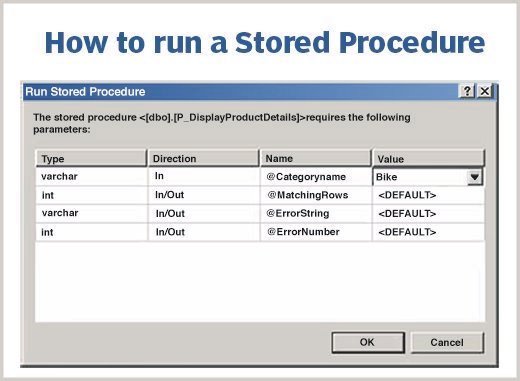
The sp_ExecuteSQLFromFile stored procedure accepts up to three parameters, but only one of them is required.

The first parameter (@PCFetch) specifies the location for the T-SQL code file. The parameter must provide a complete path, including file name, to the desired T-SQL code file. The SQL Server service account must be allowed to read files in that location.

The second parameter (@PCAdmin) is optional and it specifies the location of the format file. The parameter must provide a complete path, including file name, to the format file. The default location is a file named "File.fmt" in the SQL Server program directory ("C:\Program Files\Microsoft SQL Server\File.fmt"). The SQL code in Listing 1 creates a format file in that location.

The third parameter (@PCUltra) is optional and it specifies whether a batch information result set is returned. A value of zero (0) means no result set. A value of one (1) means a result set is returned with a row for each batch in the file.

The example below is for illustration purposes only. The path must be changed to a location appropriate for your environment.

    EXECUTE sp_ExecuteSQLFromFile 'D:\Scripts\Script.sql',NULL,1

I hope you find this system stored procedure to be useful.

Note: This tip is different from my previous tips because it's a reaction to current conditions. Please take that as an indication that I'm willing to explore topics suggested by readers. I have many ideas for future tips, but I also invite reader feedback. If you have an idea for a general purpose stored procedure, please send it my way at SQLTips@comcast.net. I'm interested in ideas for new routines or improved versions of existing routines (including the stored procedures already presented in this series).


Click for the stored procedure: sp_ExecuteSQLFromFile.txt


About the author: Brian Walker is a senior database architect in an IS department that uses SQL Server 2000 and the .NET Framework. He has more than 25 years of experience in the IT industry with the last several years focused on databases and SQL Server. Walker is a software developer, database developer, database administrator and database consultant. He develops utility software as a hobby, including a large collection of SQL Server utilities.


More information from SearchSQLServer.com

  • Fast Guide: Undocumented stored procedures
  • Tips: View our complete collection of stored procedures
  • Topic: Get stored procedure tips and tricks in this topic section


  • Rate this Tip
    To rate tips, you must be a member of SearchSQLServer.com.
    Register now to start rating these tips. Log in if you are already a member.


    Submit a Tip


    DISCLAIMER: Our Tips Exchange is a forum for you to share technical advice and expertise with your peers and to learn from other enterprise IT professionals. TechTarget provides the infrastructure to facilitate this sharing of information. However, we cannot guarantee the accuracy or validity of the material submitted. You agree that your use of the Ask The Expert services and your reliance on any questions, answers, information or other materials received through this Web site is at your own risk.


    SQL Server Development - .NET, C#, T-SQL, Visual Basic
    HomeNewsTopicsITKnowledge ExchangeTipsAsk the ExpertsMultimediaWhite PapersIT Downloads
    About Us  |  Contact Us  |  For Advertisers  |  For Business Partners  |  Site Index  |  RSS
    SEARCH 
    TechTarget provides technology professionals with the information they need to perform their jobs - from developing strategy, to making cost-effective purchase decisions and managing their organizations' technology projects - with its network of technology-specific websites, events and online magazines.

    TechTarget Corporate Web Site  |  Media Kits  |  Site Map


    All Rights Reserved, Copyright 2005 - 2010, TechTarget | Read our Privacy Policy
      TechTarget - The IT Media ROI Experts