
database management system (DBMS)

What is a database management system?
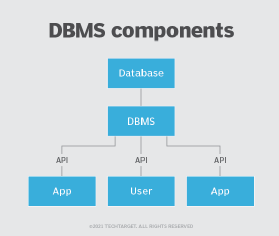
A database management system (DBMS) is system software for creating and managing databases. A DBMS makes it possible for end users to create, protect, read, update and delete data in a database. The most prevalent type of data management platform, the DBMS essentially serves as an interface between databases and users or application programs, ensuring that data is consistently organized and remains easily accessible.
What does a DBMS do?
The DBMS manages the data; the database engine allows data to be accessed, locked and modified; and the database schema defines the database's logical structure. These three foundational elements help provide concurrency, security, data integrity and uniform data administration procedures. The DBMS supports many typical database administration tasks, including change management, performance monitoring and tuning, security, and backup and recovery. Most database management systems are also responsible for automated rollbacks and restarts as well as logging and auditing of activity in databases and the applications that access them.
The DBMS provides a centralized view of data that can be accessed by multiple users from multiple locations in a controlled manner. A DBMS can limit what data end users see and how they view the data, providing many views of a single database schema. End users and software programs are free from having to understand where the data is physically located or on what type of storage medium it resides because the DBMS handles all requests.
The DBMS can offer both logical and physical data independence to protect users and applications from having to know where data is stored or from being concerned about changes to the physical structure of data. So long as programs use the application programming interface (API) for the database that the DBMS provides, developers won't have to modify programs just because changes have been made to the database.
In a relational database management system (RDBMS) -- the most widely used type of DBMS -- the API is SQL, a standard programming language for defining, protecting and accessing data.
What are the components of a DBMS?
A DBMS is a sophisticated piece of system software consisting of multiple integrated components that deliver a consistent, managed environment for creating, accessing and modifying data in databases. These components include the following:
- Storage engine. This basic element of a DBMS is used to store data. The DBMS must interface with a file system at the operating system (OS) level to store data. It can use additional components to store data or interface with the actual data at the file system level.
- Metadata catalog. Sometimes called a system catalog or database dictionary, a metadata catalog functions as a repository for all the database objects that have been created. When databases and other objects are created, the DBMS automatically registers information about them in the metadata catalog. The DBMS uses this catalog to verify user requests for data, and users can query the catalog for information about the database structures that exist in the DBMS. The metadata catalog can include information about database objects, schemas, programs, security, performance, communication and other environmental details about the databases it manages.
- Database access language. The DBMS also must provide an API to access the data, typically in the form of a database access language to access and modify data but may also be used to create database objects and secure and authorize access to the data. SQL is an example of a database access language and encompasses several sets of commands, including Data Control Language for authorizing data access, Data Definition Language for defining database structures and Data Manipulation Language for reading and modifying data.
- Optimization engine. A DBMS may also provide an optimization engine, which is used to parse database access language requests and turn them into actionable commands for accessing and modifying data.
- Query processor. After a query is optimized, the DBMS must provide a means for running the query and returning the results.
- Lock manager. This crucial component of the DBMS manages concurrent access to the same data. Locks are required to ensure multiple users aren't trying to modify the same data simultaneously.
- Log manager. The DBMS records all changes made to data managed by the DBMS. The record of changes is known as the log, and the log manager component of the DBMS is used to ensure that log records are made efficiently and accurately. The DBMS uses the log manager during shutdown and startup to ensure data integrity, and it interfaces with database utilities to create backups and run recoveries.
- Data utilities. A DBMS also provides a set of utilities for managing and controlling database activities. Examples of database utilities include reorganization, runstats, backup and copy, recover, integrity check, load data, unload data and repair database.
Popular types and examples of DBMS technologies
Popular database models and management systems include RDBMS, NoSQL DBMS, NewSQL DBMS, in-memory DBMS, columnar DBMS, multimodel DBMS and cloud DBMS.
RDBMS. Sometimes referred to as a SQL DBMS and adaptable to most use cases, RDBMS presents data as rows in tables with a fixed schema and relationships defined by values in key columns. RDBMS Tier-1 products can be quite expensive, but there are high quality, open source options such as PostgreSQL that can be cost-effective. Other examples of popular RDBMS products include Oracle, MySQL, Microsoft SQL Server and IBM Db2.
NoSQL DBMS. Well-suited for loosely defined data structures that may evolve over time, NoSQL DBMS may require more application involvement for schema management. There are four types of NoSQL database systems: document databases, graph databases, key-value stores and wide-column stores. Each uses a different type of data model, resulting in significant differences between each NoSQL type.
- Document databases store semi-structured data and descriptions of that data in document format, usually JavaScript Object Notation (JSON). They're useful for flexible schema requirements such as those common with content management and mobile applications. Popular document databases include MongoDB and Couchbase.
- Graph databases organize data as nodes and relationships instead of tables or documents. Because it stores the relationship between nodes, the graph system can support richer representations of data relationships. The graph data model doesn't rely on a strict schema, and it can evolve over time. Graph databases are useful for applications that map relationships, such as social media platforms, reservation systems or customer relationship management. Examples of popular graph databases include Neo4j and GraphDB.
- Key-value stores are based on a simple data model that pairs a unique key with an associated value. Due to this simplicity, key-value stores can be used to develop highly scalable and performant applications such as those for session management and caching in web applications or for managing shopping cart details for online buyers. Examples of popular key-value databases include Redis and Memcached.
- Wide-column stores use the familiar tables, columns and rows of relational database systems, but column names and formatting can differ from row to row in a single table. Each column is also stored separately on disk. As opposed to traditional row-orientated storage, a wide-column store is optimal when querying data by columns, such as in recommendation engines, catalogs, fraud detection and event logging. Cassandra and HBase are examples of wide-column stores.
NewSQL DBMS. Modern relational systems that use SQL, NewSQL database systems offer the same scalable performance as NoSQL systems. But NewSQL systems also provide ACID (atomicity, consistency, isolation and durability) support for data consistency. A NewSQL DBMS is engineered as a relational, SQL database system with a distributed, fault-tolerant architecture. Other typical features of NewSQL system offerings include in-memory capability and clustered database services with the ability to be deployed in the cloud. Many NewSQL DBMS packages have fewer features and components and a smaller footprint than legacy relational offerings, making them easier to support and understand. Some vendors now eschew the NewSQL label and describe their technologies as distributed SQL databases. CockroachDB, Google Cloud Spanner, NuoDB, Volt Active Data and YugabyteDB are examples of database systems in this category.
IMDBMS. An in-memory database management system predominantly relies on main memory for data storage, management and manipulation. By reducing the latency associated with reading from disk, an IMDBMS can provide faster response times and better performance but can consume more resources. Therefore, an in-memory database is ideal for applications that require high performance and rapid access to data, such as data stores that support real-time HTAP (hybrid transactional and analytical process). Any type of DBMS (relational, NoSQL, etc.) can also support in-memory processing. SAP HANA and Redis are examples of in-memory database systems.
CDBMS. A columnar database management system stores data in tables focused on columns instead of rows, resulting in more efficient data access when only a subset of columns is required. It's well-suited for data warehouses that have a large number of similar data items. Popular columnar database products include Snowflake and Amazon Redshift.
Multimodel DBMS. This system supports more than one database model. Users can choose the model most appropriate for their application requirements without having to switch to a different DBMS. For example, IBM Db2 is a relational DBMS, but it also offers a columnar option. Many of the most popular database systems similarly qualify as multimodel through add-ons, including Oracle, PostgreSQL and MongoDB. Other products, such as Azure Cosmos DB and MarkLogic, were developed specifically as multimodel databases.
Cloud DBMS. Built in and accessed through the cloud, the DBMS may be any type (relational, NoSQL, etc.) and a conventional system that's deployed and managed by a user organization or a managed service provided by the database vendor. Popular cloud services that enable cloud database implementation include Microsoft Azure, Google Cloud and AWS.
Benefits of using a DBMS
One of the biggest advantages of using a DBMS is that it lets users and application programmers access and use the same data concurrently while managing data integrity. Data is better protected and maintained when it can be shared using a DBMS instead of creating new iterations of the same data stored in new files for every new application. The DBMS provides a central store of data that multiple users can access in a controlled manner.
Central storage and management of data within the DBMS provide the following:
- data abstraction and independence;
- data security;
- a locking mechanism for concurrent access;
- an efficient handler to balance the needs of multiple applications using the same data;
- the ability to swiftly recover from crashes and errors;
- strong data integrity capabilities;
- logging and auditing of activity;
- simple access using a standard API; and
- uniform administration procedures for data.
Another advantage of a DBMS is that database administrators (DBAs) can use it to impose a logical, structured organization on the data. A DBMS delivers economy of scale for processing large amounts of data because it's optimized for such operations.
A DBMS can also provide many views of a single database schema. A view defines what data the user sees and how that user sees the data. The DBMS provides a level of abstraction between the conceptual schema that defines the logical structure of the database and the physical schema that describes the files, indexes and other physical mechanisms the database uses. A DBMS enables users to modify systems much more easily when business requirements change. A DBA can add new categories of data to the database without disrupting the existing system, thereby insulating applications from how data is structured and stored.
However, a DBMS must perform additional work to provide these advantages, thereby incurring overhead. A DBMS will use more memory and CPU than a simple file storage system, and different types of DBMSes will require different types and levels of system resources.
Drawbacks of DBMSes
Perhaps the single biggest drawback is the cost of the hardware, software and personnel required to run an enterprise DBMS, such as SQL Server, Oracle or IBM Db2. The hardware is usually a high-end server with a significant amount of memory configured, coupled with large disk arrays to store the data. The software includes the DBMS itself, which is pricey, as well as tools for programming and testing and for DBAs to enable management, tuning and administration.
From a personnel perspective, using a DBMS requires hiring a DBA staff, training developers in the proper usage of the DBMS, and possibly hiring additional systems programmers for managing installation and integrating the DBMS into the IT infrastructure. Dealing with additional complexity is also a concern when implementing a DBMS.
The DBMS software is complex and requires in-depth knowledge to properly implement and manage. But the DBMS interfaces with many other IT components, such as the OS, transaction processing systems, programming languages and networking software. Ensuring the proper configuration and efficiency of such a complicated setup can be difficult and cause performance slowdowns or even system outages.
Some of the cost and administrative overhead of running enterprise database systems can be alleviated by the cloud computing model. For example, the cloud service provider (CSP) installs and manages the hardware, which can be shared across cloud users. Furthermore, storage, memory and other resources can be scaled up and down as required based on usage needs. And basic DBA tasks like patching and simple backups become the responsibility of the CSP. Therefore, it can be easier and more cost-effective for some databases to be deployed in the cloud instead of on-premises.
DBMS use cases
Enterprises that need to store data and access it later to conduct business have a viable use case for deploying a DBMS. Any application requiring a large amount of data that needs to be accessed by multiple users or customers is a candidate for using a DBMS. Most medium to large organizations can benefit from using a DBMS because they have more data-sharing and concurrency needs and are able to more readily overcome cost and complexity issues. Sample customer use cases for DBMS technology include the following:
- Applications can include storing customer and account information, tracking account transactions such as withdrawals and deposits, and tracking loan payments. ATMs are a good example of a banking system that relies on a DBMS to track and manage that activity.
- DBMSes manage sales for any type of business, including storing product, customer and salesperson information and recording the sale, tracking fulfillment and maintaining sales history information.
- Most commercial airlines rely on a DBMS for data-intensive applications such as scheduling flight plans and managing customer flight reservations.
- Manufacturing companies depend on a DBMS to track and manage inventory in warehouses. A DBMS can also be used to manage data for supply chain management applications that track the flow of goods and services, including the movement and storage of raw materials, work-in-process inventory and finished goods from the point of origin to the point of consumption.
- A DBMS also makes it easier for a company to track and manage employee information in a human resources management application, including managing employee data such as addresses, phone numbers, salary details, payroll and paycheck generation.
Changes in how DBMSes are built, sold and serviced
By 2019, open source DBMS technologies were rapidly gaining traction. In fact, Gartner projected that open source databases would account for 10% of total spending on database software for that year due to increased enterprise adoption. By 2022, three of the top five databases ranked by DB-Engines were open source. Most mainstream IT organizations use open source software in some of their mission-critical operations. This trend complements two others: acquisitions of open source database vendors by bigger rivals and the expansion of the cloud-based database service market.
In 2019, Gartner also said that cloud databases were driving most of the growth in the DBMS market, describing the cloud as "the default platform for managing data." In 2021, Gartner concluded that "by 2022, cloud database management system revenue will account for 50% of the total DBMS market revenue." In connection with the increasing shift toward the cloud, numerous DBMS vendors have introduced managed cloud database services that offer to free IT and data management teams from many of the tasks required to deploy, configure and administer database systems.
Another growing trend is what Gartner refers to as HTAP -- using a single DBMS to deliver both transaction processing and analytics without requiring a separate DBMS for each operation. To support this trend, more DBMS vendors are creating hybrid database systems that deliver multiple database engines within a single DBMS. Most hybrid DBMSes provide a combination of relational and multiple NoSQL engines and APIs. Examples include Altibase, Microsoft's Azure Cosmos DB and DataStax Enterprise.
History of database management systems
The first DBMS was developed in the early 1960s when Charles Bachman created a navigational DBMS known as the Integrated Data Store. Shortly after, IBM developed Information Management System (IMS), a hierarchical DBMS designed for IBM mainframes that's still used by many large organizations today.
The next major advancement came in 1971 when the Conference/Committee on Data Systems Languages (CODASYL) standard was delivered. Integrated Database Management System is a commercial implementation of the network model database approach advanced by CODASYL.
But the DBMS market changed forever as the relational model for data gained popularity. Introduced by Edgar Codd of IBM in 1970 in his seminal paper "A Relational Model of Data for Large Shared Data Banks," the RDBMS soon became the industry standard. The first RDBMS was Ingres, developed at the University of California, Berkeley by a team led by Michael Stonebraker in the mid-1970s. At about the same time, IBM was working on its System R project to develop an RDBMS.
In 1979, the first successful commercial RDBMS, Oracle, was released, followed a few years later by IBM's Db2, Sybase SQL Server and many others.
In the 1990s, as object-oriented (OO) programming became popular, several OO database systems came to market, but they never gained significant market share. Later in the 1990s, the term NoSQL was coined. Over the next decade, several types of new non-relational DBMS products, including key-value, graph, document and wide-column store, were grouped into the NoSQL category.
Today, the DBMS market is dominated by RDBMS, but NewSQL and NoSQL database systems continue to grow in popularity.