application programming interface (API)
What is an API?
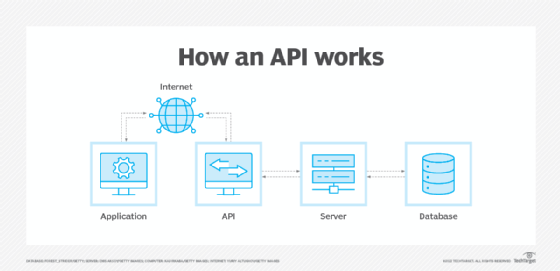
An application programming interface (API) is code that enables two software programs to communicate. An API defines how a developer should request services from an operating system (OS) or other application, and expose data within different contexts and across multiple channels.
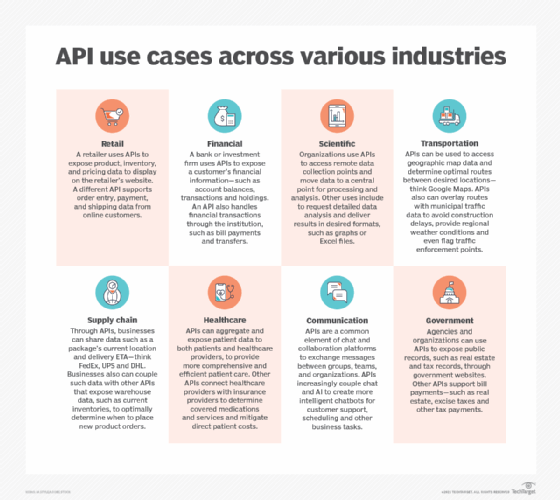
Any data can be shared with an application programming interface. APIs are implemented by function calls composed of verbs and nouns; the required syntax is described in the documentation of the application being called. For example, on a real estate website, one API might publish available real estate properties by geography, while a second API provides current interest rates and a third offers a mortgage calculator.
In the early days of Web 2.0, the concept of integrating data and applications from different sources was called a mashup. The web, software designed to exchange data via the internet and cloud computing have all combined to increase the interest in APIs and services.
How do APIs work?
APIs are made up of two related elements:
- a specification that describes how information is exchanged between programs in the form of a request for processing and a return of the necessary data; and
- a software interface written to that specification and published in some way for use.
The software that wants to access the features and capabilities of the API is said to call it, and the software that creates the API is said to publish it.
APIs authorize and grant access to data that users and other applications request. Access is authenticated to a service or portion of functionality using predefined roles that govern who or what service can access specific actions and data. APIs also provide an audit trail that details who and what have had system access and when it happened.
Applications that call APIs were traditionally written in specific programming languages. Web APIs can be called through any programming language, but webpages created in Hypertext Markup Language (HTML) or application generator tools can also access them.
The most common architectures for APIs are Representational State Transfer (REST) and Simple Object Access Protocol (SOAP), which defines a standard communication protocol specification for a message exchange based on Extensible Markup Language or XML. SOAP requires less low-level infrastructure-related code than REST. However, REST APIs are easier to scale and redeploy, and simpler to implement and integrate with websites and services. REST APIs are most often used today, particularly for web interactions.
Why APIs are important for business
APIs have improved the quality and delivery of software and services. Custom software that was developed for a specific purpose is often written to reference APIs that provide features that are useful in a variety of contexts. This reduces development time, cost and the risk of errors.
The growing number of web services that cloud providers expose through APIs also has encouraged the creation of cloud-specific applications, internet of things efforts and apps to support mobile devices and users.
APIs add a digital layer through which a company's data and enterprise assets are presented with requisite governance and security. This approach enhances customer, employee and partner interactions. Greater functionality and scope of services increase the value delivered to users and improves the customer experience. For example, the previously website anticipates a customer's needs related to searching for real estate.
APIs also create new monetization opportunities for businesses, such as the productization of data with customized packages and plans for business partners.
What are the benefits of using APIs?
APIs are a set of rules. They standardize how developers write application code, improving an organization's internal software development processes.
Using the same rules and formats streamlines code and makes it more transparent. Standardization also facilitates collaboration among developers as they build software components with the intent to integrate with APIs. This, in turn, facilitates feature development and reduces time to market.
Public APIs and ones shared with partners enable an organization to do the following:
- securely control and manage how users and systems access data and service functionality;
- allow third parties to use its data -- even in a limited sense -- which increases a company's brand exposure;
- grow its customer database and increase its conversion rate by aligning its services with other trusted brands; and
- monetize its APIs so that they become a line of revenue. This is a common tactic for online payment gateways. For example, companies that use PayPal's APIs are willing to pay to use a trusted payment system.
Challenges of using APIs
There are challenges and limitations associated with APIs, including the following:
- API development can be complex and costly to integrate with the systems and data they represent. Certain types of functionality might be better addressed through an approach such as robotic process automation.
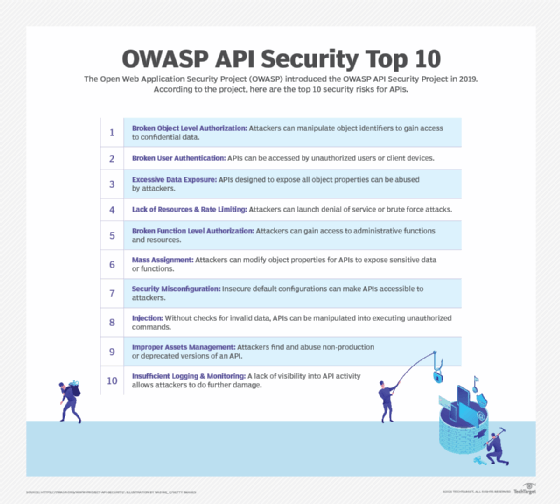
- Because they are driven by standardization, APIs are also vulnerable to cyber attacks related to data exposure, user authentication, object-level and function-level authorization, mass assignment and injection attacks.
- APIs are frequently updated, making it difficult to keep documentation up to date. Proper API lifecycle management and deprecation of old APIs can help mitigate this challenge.
- APIs must be tested to ensure they perform as needed. The best approach is to codify testing practices.
Types of APIs
There are four types of APIs: private, public, partner and composite.
- Private APIs, or internal APIs, are published internally for use by the company's developers to improve its own products and services. Private APIs are not exposed to third parties.
- Public APIs, or open APIs, are published publicly for anyone to use. There are no restrictions on these APIs.
- Partner APIs can only be used by specific parties with which a company agrees to share data. These APIs are used in business relationships, often to integrate software between partnering companies.
- Composite APIs combine multiple APIs to address related or interdependent tasks. They often improve speed and performance compared with individual APIs.
APIs also are classified as local, web, remote and program.
- Local APIs offer OS or middleware services to applications. Examples of local APIs include Microsoft's .NET APIs, the telephony API for voice applications and database access APIs.
- Web APIs are designed to represent resources such as HTML pages and are accessed using a simple Hypertext Transfer Protocol, or HTTP. Any web URL activates a web API. Web APIs are often called RESTful APIs because the publisher of REST interfaces doesn't save any data internally between requests. As such, requests from many users can be intermingled as they would be on the internet.
- Remote APIs interact through a communication network to manipulate resources outside of the computer making the request. This is a broader category that includes but is not limited to web APIs. Remote APIs do not need to be designed based on web standards, though many are. The Java Database Connectivity API and the Java Remote Method Invocation API are two examples of remote APIs.
- Program APIs are based on remote procedure call (RPC) technology that makes a remote program component appear to be local to the rest of the software. Service-oriented architecture APIs, such as Microsoft's WS-series of APIs, are program APIs.
Why API design matters
Good API design is critical for successful API use. Software architects spend considerable time reviewing all the possible applications of an API and the most logical way for it to be used.
The data structures and parameter values are of particular importance because they must match between the caller of an API and its publisher.
Strong security is also an important aspect of API design. Exploitation of misconfigured APIs is a common practice for cyber attackers. APIs are a gateway that present an organization's systems and data to internal and external users. Any compromise can create broad and serious security problems.
What are examples of APIs?
Operating systems and middleware tools expose their features through collections of APIs usually called toolkits. Two different sets of tools that support the same API specifications are interchangeable to programmers and are the basis for compatibility and interoperability claims. Microsoft's .NET API specifications are the basis for an open source Linux equivalent middleware package now supported by Microsoft, for example.
Many software products and tools deliver functionality via APIs, from DevOps tools such as Docker, Jenkins and GitLab to enterprise platforms such as Microsoft SharePoint. Social media, in particular, takes advantage of open APIs to facilitate third-party functionality, such as the ability to create news feeds and share photos.
The internet is the primary driver for APIs. Companies such as Facebook, Google and Yahoo publish APIs to encourage third-party developers to build on their capabilities. These APIs have provided everything from new internet features that browse the sites of other services, to mobile device apps that offer easy access to web application resources. New features, such as content delivery, augmented reality and novel applications of wearable technology, are created in large part though these APIs.
API trends
The ubiquity of the internet, expanded use of cloud computing and a shift from monolithic applications to microservices have all contributed to increased API use. Trends around APIs include the following:
REST and the web. Web API calls can come from any programming language, but webpages created in HTML or application generator tools can also make them. The increased role of the internet and the cloud in daily life and business activities has expanded the use of APIs and simple programming tools, or even no programming at all, for API access.
Both REST and SOAP can invoke and connect to, manage and interact with cloud services. REST is increasingly preferred for web APIs because it uses less bandwidth and offers more options for programming languages, such as JavaScript and Python. Large websites, such as Amazon, Google, LinkedIn and Twitter, use RESTful APIs.
APIs and the cloud. Cloud computing introduces new capabilities to divide software into reusable components, connect components to requests and scale the number of copies of software as demand changes.
These cloud capabilities have shifted the focus of APIs from simple RPC-based programmer-centric models to RESTful web-centric models, and even to what is called functional programming or lambda models of services that can be instantly scaled as needed in the cloud.
APIs as services. The trend to think of APIs as representing general resources has changed. Many applications and users do make use of APIs as a general tool, but they are also considered services and will normally require more controlled development and deployment.
SOA and microservices are examples of service APIs. Services are the hottest trend in APIs, to the point where it's possible that all APIs in the future will be seen as representing services.
Artificial intelligence in APIs. AI and machine learning are increasingly being used to automatically generate documentation and monitor API usage trends.
API publishing and management
The company that publishes the API controls all aspects of its design and use, including security, reliability and charging for use. It also controls the addition of functions, whether they are developed by the publisher or third parties. That means the company must uphold API performance under its terms of service, as it would with any application or service.
The following are key aspects of API publishing and management:
API testing. Like all software, APIs must be tested. This validates the published API against the specifications that users employ to format their requests. API testing also ensures that:
- application endpoints and data sharing functions work as expected;
- partners' data feeds send the expected data, how, when and where it's expected;
- junk data does not enter a database and create application problems or data corruption issues; and
- an application functions across all platforms, including desktop, web and mobile.
API testing is usually done as part of application lifecycle management, both for the software that publishes the API and for all the software that uses it. APIs also must be tested in their published form to ensure that they can be accessed properly.
API management. API management refers to the set of activities associated with publishing an API for use. Management makes it possible for users to find the API and its specifications and regulate access to it based on owner-defined permissions or policies.
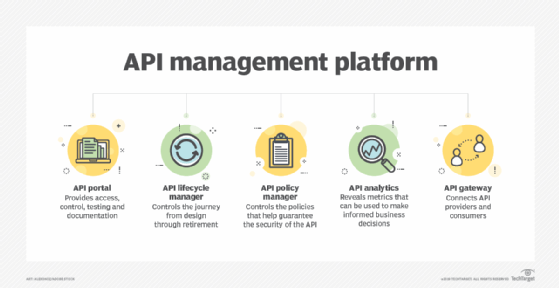
API management has become prevalent as businesses increasingly depend on them, adopt more of them and deal with the administrative complexities that they introduce. Organizations have different management needs, but they typically encompass basic functions, including security, governance, analytics and version control.
APIs require strong documentation, advanced levels of security, comprehensive testing, routine versioning and high reliability. To address these requirements, organizations use API management software, either as a combined platform or with individual tools. These tools typically involve several core components: a developer portal, lifecycle management, a policy manager, analytics and an API gateway.
API endpoints and security. API endpoints are the points where the client and server communicate, and where the API receives resource requests. They are typically a URL exposed by the server that enables other systems to connect to the endpoints. They function as entry points into the corporate network. Endpoints are where a developer's code interacts with an organization's code and data.
API endpoints are attractive targets to attackers and must be protected. Some security measures are as follows:
- Use rate limiting to discourage bots and distributed denial of service threats.
- Validate input to ensure correct data is coming in and prevent injection attacks.
- Store passwords as asymmetric hashed values.
Find out everything you need to know about building an enterprise API strategy with this comprehensive guide.