flat file
What is a flat file?
A flat file is a collection of data stored in a two-dimensional database in which similar yet discrete strings of information are stored as records in a table. The columns of the table represent one dimension of the database, while each row is a separate record. It is called a flat database because there are only two dimensions, rows and columns, with no relationships to other data elements.
The information stored in a flat file is generally alphanumeric with little or no additional formatting. The structure of a flat file is based on a uniform format as defined by the type and character lengths described by the columns. Each row is a separate data entry.
One of the most prominent flat file examples is a comma-separated values (CSV) file. A CSV file is one in which table data is gathered in lines of American Standard Code for Information Interchange (ASCII) text with the value from each table cell separated by a comma and each row represented by a new line. A flat file database comprises a single table.
There are other types of simple ASCII text-only file databases. A tab-separated value file uses the tab character to delimitate columns. Other common delimiting characters are spaces, semicolons and pipes. Some flat files use fixed-length columns.
Types of flat files
While the term flat file is most often used to describe a flat-file database, it can also refer to other types of files that don't resemble databases at all. There is some ambiguity about whether control characters, such as line breaks, can be included in a flat file.
For example, a Microsoft Word document that has been saved as text only may be considered a flat file. The resulting file contains records -- lines of text of a certain uniform length -- but no formatting information -- for example, about title or subtitle sizes and positions or information that a program could use to create a table of contents for the text file.
In its broadest sense, flat file may refer to any text file that has minimal or no formatting besides the use of the ASCII character set. In this sense, a flat file is any file created by simple text editors, such as Notepad, Vim or Nano (for Linux). The term plaintext is most often used to describe this type of file.
What are the key characteristics of a flat-file database?
A flat-file database is a simple two-dimensional repository of like data. The data is arranged in rows, or records, across columns, or fields. Each row contains the same type of information as the other rows in the flat file; that information is defined by the columns, which describe the type of data and set a limit on the number of characters allowed to represent the field information.
As noted, columns are separated by a single ASCII control character, such as a tab (keyboard sequence is Alt + 09) or a comma (Alt + 44). Each row is delineated by a carriage return (Alt + 013).
A flat-file database has no predetermined limit for the number of rows it might contain. The size of a flat-file database may be limited by the host computer's operating system (OS) or its file system. If a database application is used to create the flat-file database, that application may apply limits to the number of rows, column lengths and overall file size.
There are two basic tools for manipulating the information in a flat-file database: column sorting and search. Some applications, such as spreadsheets that allow creation of flat-file databases, may provide additional, more sophisticated data manipulation tools. Sorting enables a user to arrange the data in an ascending or descending alphanumeric order based on the contents of one column; search finds specific strings of text or numerals throughout the flat-file database.
Flat files do not contain any embedded indexing or sorting. This means that extremely large flat-file databases can be slow to search and sort. To do these operations, the entire file needs to be read into memory and then reexported. This means that flat-file databases are not suitable for large databases that need to be queried.
What is a flat-file database used for?
Although they provide relatively rudimentary means of storing, manipulating and accessing data, flat files are still widely used for a number of contemporary applications. Flat-file databases are still useful as easy-to-create and easy-to-maintain data files for commonly accessed information, such as names, addresses, membership lists or class rosters. Spreadsheet applications, such as Microsoft Excel or Google Sheets, can be used to create and manipulate flat-file databases.
Flat-file databases are highly portable and can be opened and read by almost any program and OS. Many programs use flat-file CSV databases as a way to exchange information. For example, Microsoft Outlook might export a list of contacts in CSV format, which can then be easily imported into Google Contacts.
Some may consider other data interchange formats as flat files. Extensible Markup Language, JavaScript Object Notation and YAML Ain't Markup Language have data structures specified by their creator and can have nested data more complicated than simple flat files. These types of files are replacing simple CSV files for data interchanges in some cases.
Flat files are also widely used in internet of things and data warehouse/data lake environments. For those applications, a flat-file database's simplicity is advantageous as a low-overhead, easy-to-access way to store voluminous information that needs to be preserved in its native state.
Flat-file databases can have a practically unlimited number of rows. This makes them useful for logging and other situations where rows are appended at the end of a file. These types of log files can then be regularly ingested into another retention database, which can then apply indexing and other optimizations to make the data searchable.
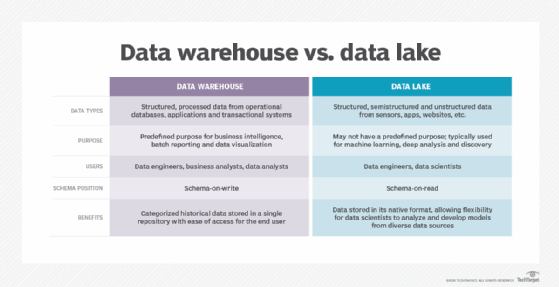
Another application for flat-file databases is in the management of object storage systems, such as Amazon Simple Storage Service. Object storage is commonly used by cloud storage services because it can accommodate massive volumes of data. The data stored on object systems is managed by a nonhierarchical flat-file database that retains basic information about the data, such as the file names and where they are stored on media. These object storage repositories might be called flat-file systems because there is no nesting of data in folders.
Large language models (LLMs) and other machine learning tools are usually trained on data stored in flat files. LLMs need massive data sets that are unstructured and need to be quickly imported and worked with. Before it can be processed, the data needs to be pulled into a simple format with all the formatting and other information removed.
Flat-file database vs. relational database
A flat-file database is sometimes confused with a relational database, but the two types of databases are significantly different in both form and function.
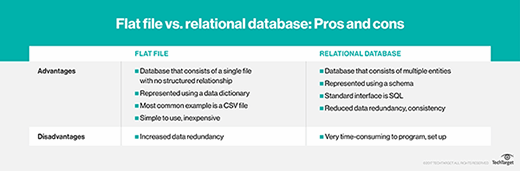
A flat file consists of a single table of data. It enables the user to specify data attributes, such as columns and data types, table by table and stores those attributes separate from applications. This type of file is commonly used to import data in data warehousing projects.
In relational databases, the term flat file is sometimes used as a synonym for a table. A relational database contains multiple tables of data that relate to each other and enables the user to specify information about multiple tables and the relationships between those tables, offering flexibility and control over database constraints.
For example, a relational database might have one table that lists students' names, addresses and phone numbers and a second table that holds the students' names, their current scholastic year and their major areas of study. In a relational database, the two separate tables can be associated with each other via their common field: student name.
This process essentially joins the two tables together so that relevant information can be located and drawn from the two distinct tables simultaneously, such as students' names, their majors and their phone numbers.
To gain the same effect with a flat-file database, all the information has to be contained in a single file, or separate flat-file databases have to include some redundant information. Because flat-file databases contain redundant data, they are denormalized.
As such, relational databases are more sophisticated and can be expansive, encompassing dozens or more separate tables. A relational database application must have knowledge of how the data is organized within multiple files. And specialized tools, such as Structured Query Language (SQL), have to be used to associate the various tables and to find and extract data.
Selecting the appropriate database for your enterprise applications can be difficult. Learn how to choose the right database to fit your data model(s).